Showing posts with label Banking Software. Show all posts

Thursday, September 24, 2009

Budget (Windows)


Tired of living payday to payday? Can't get out of debt? Try a better way to manage your bank account(s). Budget is based on the tried and true envelope method of budgeting. It's a much easier way to see where your money is, where it's needed, and where it went.

Features:
  • Variable Pays: Handles pays that vary in frequency and amount.
  • Bank Account Management: Record checks, debits, and deposits, and easily balance your checkbook.
  • Reminders: Repeating transactions such as monthly bills can be set up as reminders.
  • Define Pay Sources: Set up your income to automatically distribute funds to various envelopes.
  • Print Checks: Print personal or business checks, including an image of your signature, on any printer.
  • Automatic Backup: Keeps a copy of your last data file.
  • QIF Import: Convert data from other applications, or download your transactions from a bank.
  • Multiple Bank Accounts: Define as many bank accounts as you need.
  • Credit Cards: Track your credit card spending, and stay out of debt.
  • Reports and Statistics: See how well you are keeping within your budget.
  • Powerful Search Capability: Find any transaction using a combination of different criteria.
  • Spring-Loaded Envelopes: Using drag and drop to transfer money, group envelopes will spring open.

Download Budget (Windows) [>>]

Tuesday, September 15, 2009

Cebu Business Software Solutions

CeBuSoft introduces the released of the new Accounting Information System softwares. The system was developed using Microsoft Visual Basic and Microsoft Access database. It also uses MySQL database server in client/server application which are intended for scalable and robust operations.

System Requirements:
  • Microsoft Windows 98/ME/2000/XP/Vista
  • Microsoft Data Access Components 2.8
  • Pentium III or higher
  • 128 RAM memory or higher
  • at least 20MB harddisk space
Source: www.cebusoft.com

Get Cebu Business Software Solutions [>>]

Tuesday, August 4, 2009

MICR Font Check Design & Printing Software

IDAutomation's MICR E13B font meets strict ISO, ABA and ANSI standards and allows printing of MICR E-13B fonts for bank checks and paper based drafting. These MICR fonts are compatible with Oracle eBusiness Suite, Peachtree as well as other accounting packages and run on Microsoft Windows®, Pocket PC, Macintosh, Unix, Linux and other operating systems.

This package includes the following:
  • A single precise MICR font that usually eliminates the need to calibrate the font to the printer.
  • Calibration software for printers that are out of alignment.
  • 24 additional MICR fonts at various widths and intensities.
  • Easy-to-use Bank Check Design and Printing Software.
  • IDAutomation Security Fonts for printing secure names and amounts.
  • MICR print specifications.
  • Several MICR font versions provided including TrueType, OpenType, PCL laserjet soft fonts and PostScript.
Source: www.idautomation.com

Download MICR Font Check Design & Printing Software [>>]

Monday, August 3, 2009

Accounts & Budget


Accounts & Budget is a simple accounting software that gives you all necessary tools to manage your accounts, your expenses and your budget for home and office.

Available language : French, Us, Italian, Danish, Polish

Features

For simple needs (for home) :
  • Enter all your banking transactions. (expenses, income and transfers)
  • Plan your periodic transactions.
  • Consult the balances of your accounts.
  • Consult the list of transactions.
  • Consult the notification of next transactions.
  • Study the report of transactions.
  • Simulate a bank loan.
  • Manage your debts.
  • record all your assets.
And more (for small business...) :
  • Plan your budget.
  • Split the transactions.
  • Display the budgetary differences.
  • Manage several financial currencies.
  • Consult the statistics.
  • Manage your portfolio.
  • Import QIF, OFX, OFC, CSV files.
  • Export the data to CSV, HTML, QIF, OFX files.
  • Link your invoices (bills) scanned to transactions.
Adapt the software to your needs :
  • Manage some profiles to specify default data, alerts...
  • You can store the data where you want (Hard disk, network, SD...)
  • You can translate all the software or choose an available languages (French, US, Italian, danish...)

Source : www.alauxsoft.com

Download Accounts & Budget [>>]

Monday, July 27, 2009

Bank Account

Manage easily and safely your personal bank accounts It is complete software for bank account management and personal assistant. His user friendly-interface makes it a simple, powerful, fast and safe tool. His user friendly-interface makes it a simple, powerful, fast and safe tool. The input of transactions is made quickly and safely (automatic back up).The software can manage an unlimited number of users and accounts. The input of transactions is made quickly and safely (automatic back up). The software can manage an unlimited number of users and accounts. So each user can own his personal accounts. So each user can own his personal accounts. Manage one's accounts has never been so easy! Manage one's accounts has never been so easy!

Features:
  • Unlimited number of users, each family member can manage their bank accounts.
  • Number of unlimited bank account.
  • Management Targets (monthly, bimonthly, quarterly, biannual, annual).
  • Models created your recurring transactions.
  • Tallying the accounts.
  • Management of the final balance and the balance points.
  • Search operations.
  • Statistics on your expenses and income.
  • Statistics on the evolution of your expenses and income.
  • Simulation of loan and investment (Calculation of recoverable amount of a loan, the calculation of a report by investment, notary fees, mortgages. ...)
Source: www.emjysoft.com

Download Bank Account [>>]

Friday, July 24, 2009

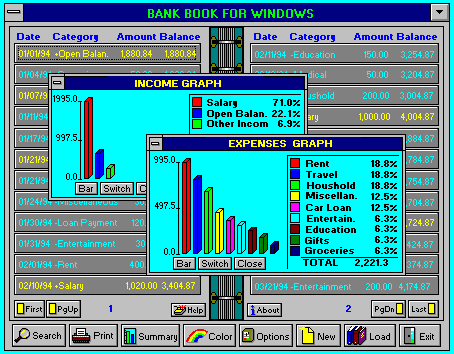
Bank Book 5.1


Overview
Bank Book for Windows: gives you an easy way to gather and organize information about all your accounts. The Bank Book includes fields for transaction name, category, amount, comment, date,..... It allows an unlimited number of entries and automatically sorts them.

Features
  • Notebook-like interface;
  • Intuitive, easy-to-use, very fast, and small;
  • Easily search for information;
  • Define filters to display only selected records;
  • Print reports from the program;
  • Display summaries;
Requirements
PC 286 CPU or better; 2 MB RAM; Color monitor; Windows 95, 98, Me, or 3.1; Requires only 400 Kbytes of disk space.


Source: www.primasoft.com

Get Bank Book 5.1 [>>]

Monday, July 20, 2009

Home Banking System 4


Home Banking System is a software that helps you track all your financial operations. Apart from tracking your BANK ACCOUNT operations, it allows you to track all your expenses. You can view various reports - e.g. how much did you spend on food in the last two months. You can create accounts for your children to show them how banks work and to persuade them for saving their money. The system is secure: user must log on to the system providing its own username and password. User may be an administrator or standard user. Administrators have access to all system data and functions, while standard users see only therir data and have blocked access to administrative tools.

Source: hbs.sourceforge.net

Get Home Banking System 4 [>>]

Friday, July 17, 2009

Signature: Digital Storage/Retrieval of Signature

The SIGNATURE image processing package is a software package for capturing, editing, compressing and display of signatures. It is mainly intended to be used for financial applications (e.g. banks). It can be provided either in source or in a library format. It can be linked with any banking application and it is the ideal solution on banking hardware platforms that use mainframes connected to PCs through local area networks (LANs) or WANs.

Signature has been written in Microsoft C and in Assembly language. Thus, it combines speed and efficiency. It can operate on IBM compatible computers having VGA card and VGA color monitor and 640 KB RAM. It can cooperate with any environment that can be linked with object code coming from MICROSOFT compilers. A signature can be captured, edited and compressed. All relevant information can be passed to the banking software environment in the form of a C structure. This environment is responsible for storing the compressed signature information in a file system (local or remotely accessible through LAN/WAN). The same banking software environment is also responsible for retrieving all relevant information and passing them to SIGNATURE for signature decompression and display. This basic software architecture makes SIGNATURE adaptable to a variety of software environments currently used in the banking sector.

SIGNATURE has two main modules:

Signature Capture, Editing & Compression
The Capture module supports flatbed scanners for A4 page size (one or multiple scanning sites). The scanner currently supported is EPSON GT6000 scanner or compatible. The module is menu and mouse driven and it is very user-friendly. Six user defined Regions-Of-Interest (ROI) can be selected for scanning. Several scanning parameters (e.g. resolution and brightness) can be also user defined. Once a signature is scanned, it can be edited on screen (optional). Editing is mouse driven. When editing is over, the signature image is compressed. The CCITT Huffman Run-Length and the CCITT Modified READ coding methods have been used. Compression ratios range from 1:3-1:10. Besides image editing, the Capture module can also display and edit customer information (company-id, name, tie) that are associated with a specific signature. Both scanning, editing and compression is very fast (in the range of a few seconds). Capture passes the compressed signature to the banking calling environment.

Signature Decompression & Display
The Display module can decompress and display a number of signatures at the same time together with customer data (name and idnumber). The decompression and display is extremely fast (less than 1 second), because it must be used very frequently and in many sites (e.g. tellers). Signatures are grouped into pages and can be browsed by using F7-F8, PgDn, PgUp, Home, End and arrow keys.

Source: www.alphatecltd.com

Get Demo Signature: Digital Storage/Retrieval of Signature [>>]

Tuesday, July 14, 2009

Margill Loan Manager


Your complete loan, mortgage and accounts receivable management solution

Margill Loan Manager allows:
  • Small and medium-sized lenders (community & social lenders, corporate lenders and individual lenders)
  • Accountants (consolidated corporate loans (liabilities) for financial statements)
  • Collection agencies
to manage, globally anywhere from ten to thousands of regular, irregular, fixed rate or variable rate loans (auto loans, personal loans, corporate loans and notes), leases, mortgages, lines of credit and receivables.

Margill Loan Manager produces:
  • Detailed payment schedules (with exact payment dates, lump sum payments, extra or missed payments, etc.)
  • Line by line status and comment (payment, missed payment, unpaid payment, late payment, extra principal, etc.) to track any of these financial instruments
  • Global (consolidated) portfolio or partial portfolio totals including end of the fiscal year totals (balance, interest, repaid principal, etc.)
  • "Events" reports such as late or unpaid payments, NSF checks, doubtful accounts
  • Client paperwork (loan or mortgage letter, proposals) which can be adapted according to your needs in any language (English, Spanish, French...). Easy merge functions with your existing Word (WordPerfect) documentation.
Compatible: Windows 98, 2000, XP, NT, Vista

Installation: Download the installer file, clic and it's done - single user or network version

Source: www.margill.com

Get Trial Margill Loan Manager [>>]

Friday, July 3, 2009

NexorOne®

NexorOne® is the leading online banking software provider for Private International Banks, Offshore Financial Institutions, Investment Fund Managers and Payment Processing Companies. NexorOne® is a robust and flexible system that offers an unlimited possibility of growth and expansion so that it will not need to be replaced by another system later. It has been designed to comply with the constantly changing needs of the financial sector by utilizing a modular and an easily updatable structure. Enabling built-in options such as multicurrency accounts, multilanguage interface and multiregional preferences, the software allows its users choose from different formats used world wide. This complete software solution has every variable needed to make it adaptable to the international market permitting your financial entity to have a world-wide expansion capability.

NexorOne® also allows for customizing every detail of the system giving each financial entity its own tailored and unique user friendly interface with the exact services offered. With intuitive interaction and features such as AssistedHelp™, efficient financial and banking services are provided to the end-user in real time, giving an incomparable competitive advantage in this expanding financial services industry.

The NexorOne® software is fully internet-based and completely cross-browser compatible, making it easily accessible from any computer connected to the internet. Based on Open Source technology the back-end of the software can be hosted on any Linux®, Windows® or Mac® platform, making it even more versatile. The system implements cutting edge standards of security and encryption to fulfill the most demanding online banking standards.

Please browse our website to learn more about our Products and Services; and the Company that stands behind these. Read what our customers have to say about us in our Testimonials page and don’t hesitate to Contact us to receive a detailed quote.

Source: www.nexorone.com

Get Demo NexorOne® [>>]

Sunday, June 28, 2009

Probanx Online Banking

Probanx Online Banking is an banking software solution designed to give you the competitive advantage required in today’s business environment. It enables international private and commercial banks to deliver a comprehensive range of online banking services to their clients.

Probanx Online Banking is the next generation of an Internet Banking System. It is a comprehensive, flexible, multi lingual, user-friendly, and high-performance customer-oriented solution that provides a cost-effective Internet banking plat-form for real-time services and straight through processing. Built on Web Services, it can be quickly inter-connected with any back-end system.

Probanx Online Banking is also available as a turn-key stand-alone solution for banks operating only on the Internet. We offer a complete package integrating all components required to run an Internet Bank.

Features:

Functionality
Probanx e-banking offers a wide range of functionalities, from account information and balances, bill payments, fund transfers, deposits, recurring payments, check management, rates info and much more. All functions can be customized to your requirements.

Integration
Probanx e-banking solution integrates seamlessly with BankCom-Pro, which guarantees fast, accurate, secure information delivery and straight through transaction processing.

Security
Probanx e-banking is equipped with a security infrastructure that firmly protects your bank and your clients from potential security threats:
  • Firewalls
  • 128-bit Encryption
  • SSL Technology
  • Complex User passwords
  • User profiles, access rights
  • Transaction Authorization
  • Full Audit Trails
Design
Probanx e-banking has been designed using the latest technology to make the system visually attractive and easy to use. It can be easily customized to reflect your banks corporate imagine and design.

Source: www.probanx.com

Get Demo Probanx Online Banking [>>]

Friday, June 26, 2009

Corniche Banking System

For more than 10 years, Corniche has brought superior functionality andflexibility to financial institutions. Megasol's design philosophy is simple- from a single application, provide multiple customisable solutions.

True multiple currency accounting
True multiple currency accounting in which each currency has its own ledger structure consolidated to a reporting currency with IFRS compliance is standard. Inter-currency positions are automatically maintained, and both your balance sheet and income statement can be presented with full details of the consolidation.

Commodities and digital currencies
Commodities can be treated as currencies allowing use of the system as a commodity broking platform. Digital currencies and digital commodities for both storage and interchange are fully supported. Exchange rates can be imported from an external data service or can updated manually. Creating your own e-currency has never been easier!

Compliance
Use unlimited storage for due diligence records such as transaction sourcing, personal identity documents, employment, bank references, addresses, and for documents associated with these records. Optionally, you may attache Corniche to third-party verification services for watch and address checking and similar functionality.

Client account classes
Corniche features a full range of normal bank account classes together with further special types. These include current, money market and savings accounts, call accounts, term deposits and CD's, loans, commodities accounts and securities accounts. In addition, non-posting memo accounts are also supported and may be used for a variety of functions such as displaying debit card statements.
Interest processing
Fixed and variable interest rates are supported, as are flexible banded interest schemes in which the type and rate of interest to be paid or charged will vary depending on the balance of the account attracting interest. You can easily offer structured investment products in which the length of investment and the banded interest are predefined and your client can then invest in the deposit product with no staff intervention required.

Fees and charges
A wide range of fee earning opportunities on all financial services are available. Accounts can attract opening, monthly or special periodic fees. Debits or credits transactions can incur charges and a number of free debits and/or free credits per month may also be specified. Multiple special fees and charges can be attached to any transaction and will be automatically billed during posting. If desired, debit advices can be printed for any fees assessed.
Agents and commissions
A powerful compensation system which splits commission payment between multiple levels of agents is standard. Commission payments may be actual amounts or percentages of transaction amounts or account balances. Commissions may be defined in ranges so that the commission payable varies depending on the range into which a transaction amount or account balance falls.

Document repository
Corniche provides the ability for both back-office and clients to scan and upload documents for attachment to transactions or for storage in the repository. Documents could support due diligence, provide additional transaction information or could be stored just for safe-keeping.

Messaging
Built-in encrypted messaging services secure communications between a client and your back-office message groups such as Accounting or Customer service. Messages can be exchanged between a client and other clients if so authorised which, for example, allow an agent to keep in touch with clients whom the agent has referred.

Source: www.megasol.se

Get Demo Corniche Banking System [>>]